Five most over-predicted elections under vote ~ growth (largest negative residuals) |
||||||
| year | vote | growth | fatalities | wars | .fitted | .resid |
|---|---|---|---|---|---|---|
| 1952 | 44.55 | 3.0325 | 205.6 | Korean | 54.04 | -9.49 |
| 1968 | 49.59 | 3.2644 | 174.3 | Vietnam | 54.73 | -5.14 |
| 2000 | 50.27 | 3.3349 | 0.0 | none | 54.94 | -4.67 |
| 1992 | 46.55 | 1.3764 | 0.0 | none | 49.12 | -2.57 |
| 1980 | 44.69 | 0.7495 | 0.0 | none | 47.25 | -2.56 |
Lab: Forecasting Elections · Part 2 of 3
Lab · Module 11 · Wed Nov 11
Welcome to the Module 11 lab
Today is Day 2 of a three-lab analysis, and this page is still a coaching guide, in the same format as last week: Targets lists, each with a link to the closest worked example, now mostly in the M11 Module and pre-study (as last week, a pre-study link opens on an activity’s Your Code tab; its 👀 Spoiler tab shows the finished code). For the core steps, Check your output boxes show the output you should get, not the code, because every pattern you’ll use today is one you have run at least once. You’ll write the code in the same bread_peace_analysis.qmd you started last week. As last week, there’s nothing to write up: the debrief at the end is where we talk through what the output shows.
Today’s questions · bread and peace in one model
Last week you checked each half of Hibbs’s claim on its own. Bread alone accounted for about half the election-to-election variation in vote, but it missed 1952 and 1968 by about 9.5 and 5.1 percentage points, and it over-predicted 2020 by about 8.4; peace alone couldn’t tell its slope apart from 0. Today you’ll put both halves into one model, the full Bread + Peace MLR (vote ~ growth + fatalities), and ask:
- The misses. With fatalities in the model, do the two elections bread alone missed worst, both wartime elections, move back toward the line?
- Each half, holding the other fixed. Among elections with the same fatalities, how does vote share track growth? And among elections with the same growth, how does it track fatalities?
- The test, again. Adding a predictor can’t reduce ordinary R² on the training data. Does the improvement in training fit also improve the 2020 and 2024 forecasts?
Notice the job you’re giving multiple regression today. In the M11 Module, MLR’s job was to estimate one quantity, REACH’s treatment contrast. Here its job is to build a model that predicts incumbent vote share, including for elections it hasn’t seen. The code is identical; what differs is what you lead with (forecasts, and how honest their intervals are) and what you guard against. Nothing here was randomized, so every coefficient describes an adjusted association, not a causal effect.
bread_peace · 17 elections · 1952–2016 · Hibbs (2000); Thomas (2020)
Same 17-row dataset you used last week. You should already have a copy in your PSY652_project/data/ folder (otherwise re-pull from the project zip). One row per presidential election. Full codebook at Course Datasets · bread_peace.
- year integer — election year
- vote numeric — incumbent party’s share of the two-party popular vote (%)
- growth numeric — weighted-average annualized growth of per-capita real disposable income over the term (%)
- fatalities numeric — cumulative U.S. military fatalities per million population over the term
- wars character — major conflict(s) contributing to the term’s fatalities
What you’ll leave with
- The Bread + Peace MLR (bp_mod2) added to your notebook, read with tidy() and glance()
- A residual-shrinkage table that lines up each election’s miss under the bread SLR and under the MLR
- A re-forecast of 2020 + 2024 from the MLR, with a CI and a PI, beside last week’s
Where today fits in the three-lab arc
| Lab | What you’ll add to bread_peace_analysis.qmd |
|---|---|
| M10 lab · last week | Steps 0–4: setup, EDA, the bread and peace SLRs, and a 2020 + 2024 forecast |
| M11 lab · today | Steps 5–7: the bread SLR’s biggest misses, the Bread + Peace MLR, and the MLR re-forecast |
| M12 lab | Steps 8–10: the diagnostic toolkit, influence, and the final forecast. After the lab: Step 11, a short reflection on all three labs |
How the time works
As last week, everything happens in the session. Work through Before you begin and Steps 5–7 in order, then we’ll stop for the debrief. If you don’t finish a step’s code in class, finish it before the M12 lab, which builds on Steps 6 and 7.
Before you begin · re-open your cumulative notebook
Open
PSY652_project/programs/bread_peace_analysis.qmd— the same notebook you started last week.Activate the M11 lab sections. In your notebook’s section outline, find the comment block that begins
<!-- Activate these in the M11 lab:and move the three Step lines inside it out of the comment, then delete the now-empty comment lines. As in M10, each step’s chunks go directly under its own header, before the next one — not at the bottom of the file. Leave an empty line above each# Stepheader that follows a chunk (otherwise the header drops out of the table of contents). Your outline should now read:# Step 0 · Setup # Step 1 · EDA # Step 2 · SLR · vote ~ growth # Step 3 · SLR · vote ~ fatalities # Step 4 · Forecasting 2020 + 2024 with the bread SLR # Step 5 · From SLR to MLR · the bread SLR's biggest misses # Step 6 · MLR · vote ~ growth + fatalities · the Bread + Peace model # Step 7 · Re-forecast 2020 + 2024 with the MLR <!-- Activate these in the M12 lab: # Step 8 · The diagnostic toolkit # Step 9 · Influence and Cook's distance # Step 10 · The final forecast # Step 11 · Reflection · what you did and learned -->Render once now. If your M10 notebook renders cleanly today, you’re ready to add M11 content. If something has broken in the week between labs (an updated package, a moved file), fix it before going further.
Put last week’s objects back in your Environment. Rendering runs your notebook in a separate R session, so it doesn’t fill your Environment pane. Choose Run → Run All in RStudio (Ctrl+Alt+R; Cmd+Option+R on a Mac) so every chunk from Steps 0–4 runs in your own session. Today you need m_growth and aug_growth from Step 2.
Step 5 · From SLR to MLR · the bread SLR’s biggest misses
In your notebook — this step’s chunk goes under # Step 5 · From SLR to MLR · the bread SLR's biggest misses.
Last week’s residual lollipop showed which elections the bread SLR missed worst. Put those misses in a table, with the predictors beside them.
Target. From aug_growth, select() year, vote, growth, fatalities, wars, .fitted, and .resid; sort with arrange(.resid), so the most negative residuals (the biggest over-predictions) come first; and keep the top five with slice_head(n = 5), which keeps a table’s first n rows (head(5) does the same). M04 Module · Sorting the rectangle — arrange()
NoteCheck your output · the five biggest over-predictions
Before you fit the MLR, make a prediction (say it to a neighbor; there’s nothing to write): when fatalities joins growth in one model, which residuals will shrink most, which sign will the fatalities slope take, and what will happen to the growth slope? Committing to a prediction before you see the result is the same idea as preregistration, and the debrief comes back to it.
Checkpoint 5 · The misses, in a table
Your Step 5 table lists the bread SLR’s five largest over-predictions, led by 1952 (-9.49) and 1968 (-5.14), with each election’s fatalities and wars beside its miss.
Step 6 · MLR · vote ~ growth + fatalities · the Bread + Peace model
In your notebook — this step’s chunks go under # Step 6 · MLR · vote ~ growth + fatalities · the Bread + Peace model.
Time to fit Hibbs’s full model and watch what happens.
Targets
- Fit the two-predictor MLR: vote on growth and fatalities. In an lm() formula, additional predictors join with
+. Call the model bp_mod2; the M12 lab builds on it by that name. M11 pre-study · Activity 2.1 - Print
bp_mod2 |> tidy(conf.int = TRUE)andbp_mod2 |> glance(). A third row appears in the tidy() output, for fatalities; each slope row reads exactly as in the M10 lab. The glance() row adds the model’s overall F-test (statistic, df, df.residual, p.value), which now asks whether both slopes are 0 at once. M11 pre-study · Activity 2.2 · M11 Module · Reading each coefficient as a partial effect - Print
m_growth |> glance()too, so you can compare R² and \(\sigma\) between last week’s bread SLR and the MLR. M11 pre-study · Activity 2.3 (two models’ fit side by side) - Build the residual-shrinkage table; the code is given in the next section.
NoteCheck your output · bp_mod2 (open after you’ve fit it)
bp_mod2 |> tidy(conf.int = TRUE) — vote ~ growth + fatalities |
||||||
| term | estimate | std.error | statistic | p.value | conf.low | conf.high |
|---|---|---|---|---|---|---|
| (Intercept) | 44.952 | 1.441 | 31.197 | 2.43e-14 | 41.861 | 48.042 |
| growth | 3.477 | 0.557 | 6.247 | 2.14e-05 | 2.283 | 4.671 |
| fatalities | -0.047 | 0.011 | -4.135 | 0.00101 | -0.071 | -0.023 |
Model fit · M10 bread SLR vs M11 Bread + Peace MLR (from glance()) |
|||||||
| model | r.squared | adj.r.squared | sigma | statistic | df | df.residual | p.value |
|---|---|---|---|---|---|---|---|
| vote ~ growth (M10) | 0.491 | 0.457 | 4.010 | 14.463 | 1 | 15 | 0.00173 |
| vote ~ growth + fatalities (M11) | 0.771 | 0.738 | 2.785 | 23.542 | 2 | 14 | 3.32e-05 |
The residual-shrinkage table
This is where the MLR’s improvement shows up, election by election. The code below lines up each election’s SLR and MLR residuals side by side. Every piece of it is wrangling you’ve done before, so it’s given: copy it into your notebook’s Step 6 section and run it. (Your rendered notebook shows the table 10 rows at a time; its Next button shows the rest, including the last row.)
# Each election's residual under the M10 bread SLR ...
slr_resid <- m_growth |> augment(data = bread_peace) |>
  select(year, vote, fatalities, .resid_slr = .resid)

# ... and under the M11 Bread + Peace MLR
mlr_resid <- bp_mod2 |> augment(data = bread_peace) |>
  select(year, .resid_mlr = .resid)

# Line them up by year; abs_shrink > 0 means the MLR's miss is smaller
shrink <- slr_resid |>
  left_join(mlr_resid, by = "year") |>
  mutate(abs_shrink = abs(.resid_slr) - abs(.resid_mlr)) |>
  arrange(desc(abs_shrink))

shrink
Reading the code: augment() returns each election’s residual under one model. Inside select(), .resid_slr = .resid keeps the residual column and renames it, so the two models’ residuals have different names once they’re joined. left_join() lines the two tables up by year. abs_shrink compares the sizes of the two misses: positive means the MLR’s residual is closer to zero (the MLR did better), negative means it’s farther. arrange(desc(abs_shrink)) puts the biggest improvements at the top. M04 Module · Combining two tables — left_join()
NoteCheck your output · the same shrinkage, as a chart (open after you’ve studied your table)
A slope chart makes the per-election change easy to see. (It’s here for reference; you don’t need to build it.) Each election gets its own connected pair: M10 residual on the left, M11 residual on the right, colored by direction of change.
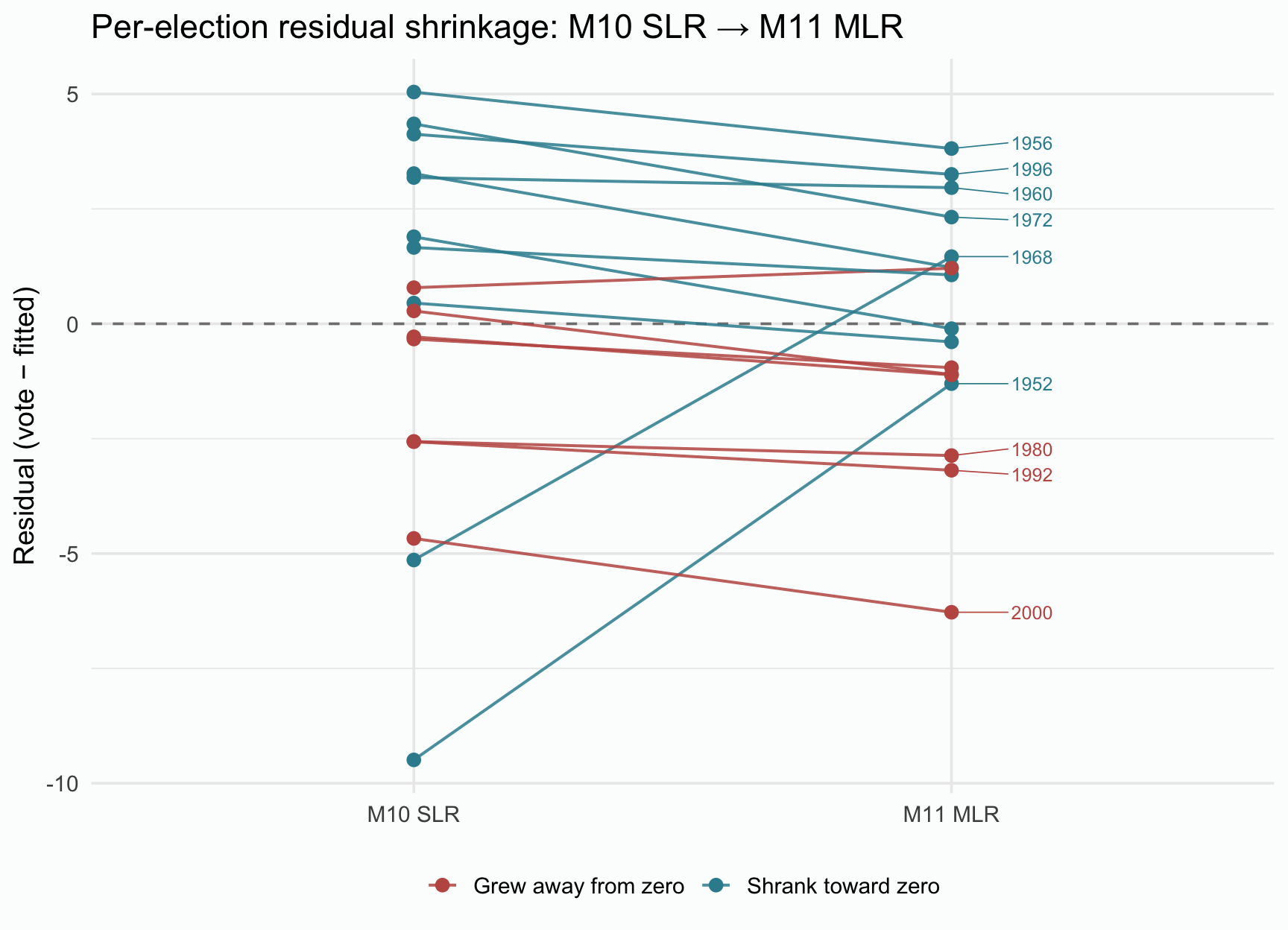
Checkpoint 6 · Hibbs, made visible
Your notebook has bp_mod2 read with tidy() and glance(), beside m_growth’s glance(). Check your numbers: growth b = 3.48 (95% CI [2.28, 4.67]), fatalities b = -0.047 (95% CI [-0.071, -0.023]), R² = .771, and \(\sigma\) = 2.785. Your shrink table has 1952 and 1968 in its first two rows and 2000 in its last.
Step 7 · Re-forecast 2020 + 2024 with the MLR
In your notebook — this step’s chunks go under # Step 7 · Re-forecast 2020 + 2024 with the MLR.
Last week’s bread SLR over-predicted Trump’s 2020 vote by about 8.4 points. Today, redo the forecast with the Bread + Peace MLR, which fits the 17 training elections much better. Fitting the training elections better is an in-sample result; whether it carries over to elections the model never saw is the out-of-sample question from last week’s Step 4, and only a forecast can answer it. A prediction model is judged by its forecasts, and by how honestly its intervals describe the uncertainty, rather than by any one coefficient.
As last week, these are retrospective predictions, and we keep the word forecast for short. The 2020 and 2024 inputs are last week’s, plus a fatalities value — 0 for both elections, per the grace-period rule of Thomas (2020).
| Scenario | Incumbent | growth | fatalities | Actual two-party vote |
|---|---|---|---|---|
| 2020 | Trump (R) | 3.72 | 0.0 | 47.73 |
| 2024 | Harris (D incumbent ticket) | 0.96 | 0.0 | 49.25 |
Targets
- Rebuild new_elections with three columns: year, growth, and fatalities (0 for both elections). This replaces last week’s two-column version; your M10 chunks still run, because they come earlier in the notebook. Keep the name, so the rest of the notebook uses this version.
- Compute the 95% CI and PI from bp_mod2 with the same predict() recipe as last week, and save them as new_ci_m2 and new_pi_m2, so last week’s new_elections_ci and new_elections_pi keep their SLR values. The M12 lab prints these two objects again as the final forecast.
- Compute each election’s forecast error (actual − predicted), as last week.
Closest examples: your own Step 4 code (the same recipe, one more column in new_elections; if you copy a whole chunk, change or delete its #| label: line, because two chunks with the same label stop a render) · M11 pre-study · Activity 2.4 (a CI and a PI from an MLR, for a tibble of scenarios)
NoteCheck your output · new_ci_m2, new_pi_m2, and last week’s forecasts beside them
The first table is new_ci_m2 (the 95% CI); the second is new_pi_m2 (the 95% PI).
And last week’s bread SLR forecasts beside this week’s:
| M10 bread SLR vs M11 Bread + Peace MLR · 2020 + 2024 forecasts | |||||||
| Scenario | Actual | SLR fit | SLR CI | SLR PI | MLR fit | MLR CI | MLR PI |
|---|---|---|---|---|---|---|---|
| 2020 (Trump) | 47.73 | 56.09 | [52.99, 59.18] | [47.00, 65.18] | 57.89 | [55.53, 60.24] | [51.47, 64.31] |
| 2024 (Harris) | 49.25 | 47.88 | [44.78, 50.98] | [38.79, 56.97] | 48.29 | [46.11, 50.47] | [41.93, 54.65] |
Checkpoint 7 · The forecast, redone
Your notebook has the three-column new_elections and the bp_mod2 forecasts saved as new_ci_m2 and new_pi_m2. Check your numbers: 2020 fit = 57.89, 95% PI [51.47, 64.31]; 2024 fit = 48.29, 95% PI [41.93, 54.65]. The forecast errors are -10.16 (2020) and 0.96 (2024).
Going further · a publication-ready regression table
This one is optional, and it doesn’t get its own Step in your notebook outline. If you’d like to try it, add the chunk to your Step 6 section, after your bp_mod2 output. It previews a tool your group project can use. The gtsummary package’s tbl_regression() function takes a fitted model and produces a journal-ready table — coefficient estimates, CIs, and p-values, all formatted for printing. M11 Module · Side-by-side regression table
# APA-style p-values: "< .001" when very small, otherwise 3 decimals with no leading zero
format_apa_p <- function(p) {
  case_when(
    is.na(p)  ~ NA_character_,
    p < .001  ~ "< .001",
    .default  = sub("^0", "", sprintf("%.3f", p))
  )
}

bp_mod2 |>
  tbl_regression(
    intercept = TRUE,
    estimate_fun = label_style_number(digits = 3),
    pvalue_fun = format_apa_p,
    label = list(
      growth ~ "Per-capita real income growth (% annualized)",
      fatalities ~ "Military fatalities per million population"
    )
  ) |>
  modify_header(label = "**Predictor**", estimate = "***b***", p.value = "***p***") |>
  as_gt() |>
gt::tab_header(title = gt::md("**Table 1. Bread + Peace MLR predicting incumbent two-party vote share, 1952–2016**"))| Table 1. Bread + Peace MLR predicting incumbent two-party vote share, 1952–2016 | |||
| Predictor | b | 95% CI | p |
|---|---|---|---|
| (Intercept) | 44.952 | 41.861, 48.042 | < .001 |
| Per-capita real income growth (% annualized) | 3.477 | 2.283, 4.671 | < .001 |
| Military fatalities per million population | -0.047 | -0.071, -0.023 | .001 |
| Abbreviation: CI = Confidence Interval | |||
As in the Module, modify_header() relabels the estimate column b, because tbl_regression()’s default heading, Beta, usually means a standardized coefficient in psychology. Two more arguments bring the numbers in line with APA: gtsummary’s defaults round to about two significant figures (the fatalities slope would print as −0.05) and write p-values with a leading zero (“<0.001”). estimate_fun = label_style_number(digits = 3) prints three decimals, and pvalue_fun = format_apa_p writes p the APA way. You can use the same code whenever you need a regression table in your own work.
Lab debrief · 15 minutes
Before you do the final render, save your work and look up. We will spend the last fifteen minutes on what your output shows.
Take one quiet minute to skim the questions below, then we’ll discuss as a group. They come back in the reflection you’ll write after the M12 lab.
Lab debrief · what does the output show?
The sticking point. Where did you get stuck today? The MLR output, the shrinkage table, the re-forecast — somewhere else? Naming it helps the next student get past it.
Your prediction, checked. Which residuals shrank the most in your shrink table? Did the improvement spread across all 17 elections, or concentrate in a few — and what about the fatalities distribution explains that? Which election got worse, and why can’t fatalities help it?
Partial slopes. Say the MLR’s growth slope in one sentence that starts “Comparing two elections with the same fatalities…”. Why is that a different quantity from last week’s SLR slope?
A classic suppression pattern. The growth slope went from 2.97 in the SLR to 3.48 in the MLR: bigger, not smaller, when fatalities entered. Why? (Think about what one SLR line had to do to fit the two wartime elections.)
Better fit, worse forecast. R² rose from .49 to .77 and \(\sigma\) fell from 4.01 to 2.78, yet the 2020 forecast moved farther from the actual result, and its PI no longer covers it. How can a better-fitting model forecast one election worse? What might the model be missing about 2020? Given that miss, how much would you trust the 2024 hit?
Forward to the M12 lab. Cook’s distance summarizes how much the fitted regression would change if one election were removed. Predict which two elections will have the largest Cook’s distances under bp_mod2, and why. Remember your answer: the M12 lab checks it.
Before you leave · render, save, and prep for the M12 lab
Before you walk out:
- Render your
bread_peace_analysis.qmd. If it doesn’t render, debug now — coming back to a broken notebook a week from now is much harder. - Save your work to GitHub (commit + push).
- If any step’s code is unfinished, finish it before the M12 lab, then render and push again.
- Glance at Steps 8–11, which we’ll add in the M12 lab. You’ll take bp_mod2 through the diagnostic toolkit, see which elections are influential (today’s Cook’s-distance prediction gets checked), and print the final 2020 + 2024 forecast. After that lab comes the one piece of writing in the three labs: a short reflection.
Double check
Before you leave today:
What you just did, in research terms
You did what a working analyst does with a multivariable model: you didn’t just add a predictor, you asked what it adds, election by election. Adding fatalities to bread pulled the two wartime elections back toward the line and changed the growth slope, a reminder that a coefficient in an MLR is a partial statement, not a fact about a variable in isolation. And the 2020 forecast taught the harder lesson: a model that fits its training elections better does not forecast every new case better.